
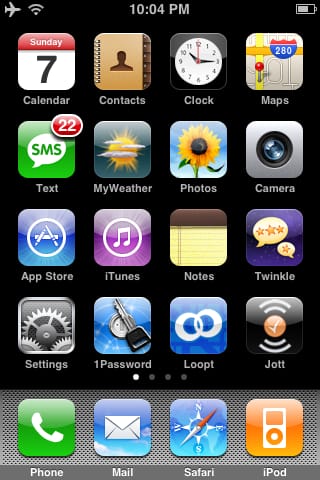
It can be frustrating to not have a system for your iPhone app
organization–especially if you’re an optimization freak like me. Here’s how
I do it: I use four screens, organized in the following way:
1. Primary Applications
These are the core applications that you use the most. I tend to keep the
most important ones in the corners so they are easy to get to, e.g.
Calendar, Maps, and Settings. Some apps of interest on this page are:
-
1Password
: A good way of storing passwords .I’d advise against using it for
sensitive stuff due to the iPhone’s unknown/weak security vs. physical
tampering. -
Loopt : Sign up your friends and see where they are around the country.
-
Twinkle
: The best Twitter app right now for the iPhone. -
Jott
: Speak notes into it, or call its voice mail number and it’ll convert
your voice to text and send the text to you. -
MyWeather
: The best weather app I’ve found

2. Secondary Applications
These are really just spillover from the primary page. Some apps of interest
on this page are:
-
Pandora
: A mandatory application. It does streaming of music you will almost
certainly like based on the bands that you do like. Even works great on
the desktop. -
Now Playing : An awesome “going to the movies” app that finds theaters
near you and gives you movie ratings using Rotten Tomatoes. -
Instapaper
: Find a site you like while browsing on your computer? Click instapaper
on your desktop and a local copy will be saved to your iPhone for later
reading. -
Stanza
: Tons of classic reading. A must have. -
Shazam and Midomi : Run this app when a song is playing and you want to
know who it is. It’ll give you the song name, band, and album. -
Urbanspoon
: Find something to eat in your area by shaking your iPhone. -
Recorder : This is your old digital recorder, in an iPhone app.

3. Specialized or Niche Applications
These include apps that you show off your device with, or only use
occasionally. Some apps of interest on this page are:
-
Ambiance : Play all sorts of soothing sounds, including those from
nature and stuff like “rain on tin roof”. -
BeeTagg
: Snap pictures of QR Codes or Data Matrices to see where they take you. -
SnapTell
: Take a picture of a book or CD in a store to see where you can buy it
for cheaper. -
Speed Test : Check the speed of your EDGE, 3G, or Wifi connection.
-
Starmap : Shows you the stars you can see from your location.
-
Constitution : A pocket constitution, but way cooler.

4. Unused Apple Applications and Games
This is where you put your unused default apps that you can’t delete, like
Weather and Stocks. I also put my games here. My favorite games are:
-
HoldEm : Apple’s excellent Poker app.

—
If you know of any apps that should be added to this list, or of a better
way of organizing them, let me know in the comments or via email at
[email protected]. ::

 Command Your Timeline: Heal the Past, Design Your FutureIntelligence,Skills Development
  SHAPTA MOCKS 2024
 Ultimate Me: Unlock Your Ultimate Potential & Energy HealingIntelligence,Skills Development
  NLSC: SENIOR THREE AGRICULTUREAgriculture,New Lower Secondary Curriculum,Ordinary Secondary
  NLSC: SENIOR THREE CHEMISTRY
 What is ChatGPT?General
 The Changing World of Crypto: How to Stay in the Game Without Losing Faith in YourselfGeneral
 Betrayal in the City by Francis ImbugaEducation lower secondary Politics
 The Moon also sets by Osi OgbuClass Subjects
- Meet Musinguzi John Paul – Your AI Teacher of Christian Religious Education for O-Level in UgandaEducation
- Meet Mbabazi Bridget – Your AI Teacher of Entrepreneurship for O-Level in UgandaEducation
 Babirye SandraO-LEVEL ENTREPRENUERSHIP,PETTY CASHBOOK ASSIGNMENT
- Babirye SandraO-LEVEL ENTREPRENUERSHIP,PETTY CASHBOOK ASSIGNMENT
- Babirye SandraO-LEVEL ENTREPRENUERSHIP,PETTY CASHBOOK ASSIGNMENT
NLSC: SENIOR THREE AGRICULTURE
- Aheebwa JosephDP: Digital Pedagogy Assignment8
- Aheebwa JosephDP: Digital Pedagogy Assignment6
- Aheebwa JosephDP: Digital Pedagogy Assignment 3
- mukose yekosanDP: Digital Pedagogy Final Project

0 responses on "Information Security as Insurance"